Chapter 3
Reading the Today screen
Today is the screen this device shows all day. Everything on it updates by itself, so there is nothing to tap unless you want to.
The Today screen
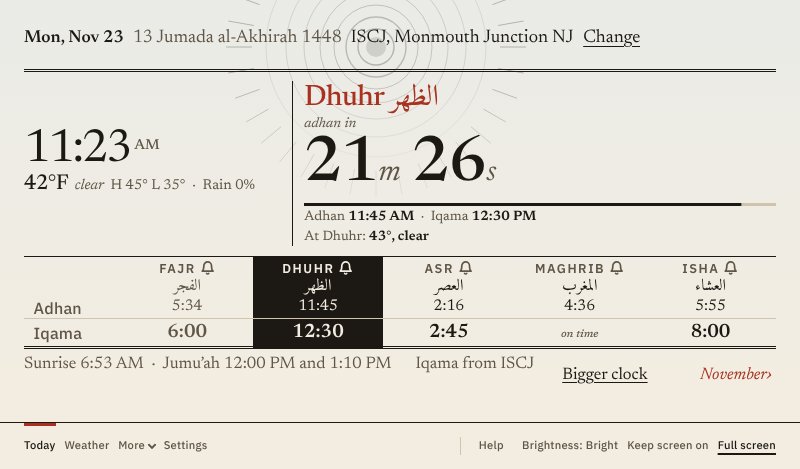
- The date, then the Hijri date. Chapter 2 shows how to move the Hijri date a day if your local moon sighting differs.
- Where the times are for. Tap Change to set your place.
- The clock. Chapter 6 shows the other clock styles you can choose.
- The weather now, with today’s high and low and the chance of rain. Tap it to open the Weather tab.
- The countdown to the next adhan or iqama, under the prayer’s name in English and Arabic, with its adhan and iqama times underneath. In the last 15 minutes the countdown is highlighted and flashes once a second, so you can see it from across the room.
- The bar fills up as the wait goes by: from the adhan to the iqama, from the iqama to the next adhan, and so on. On a big screen the day ruler takes its place (see below).
- The weather at the next prayer, from the hourly forecast: the temperature, and rain or snow when it is likely.
- The five prayers, with the adhan time on the top row and the iqama time, in heavier type, underneath. The next prayer is the column in solid ink, and the times that have passed are greyed. When the iqama is at the adhan, as it often is at Maghrib, it says on time.
- The bell beside each prayer shows its alerts: an outline for a message only, filled in when an alert makes a sound, and crossed out when that prayer’s alerts are off. Tap it to open that prayer’s alerts (chapter 5).
- Sunrise and Jumu’ah. Sunrise is when the time for Fajr ends. Jumu’ah lists the khutbah times. On Fridays they show in the Dhuhr column instead.
- Bigger clock swaps the sizes, so the time is large and the countdown smaller. Tap Bigger countdown to swap back. On phones and small tablets the countdown is the large one to begin with, on bigger screens the clock.
- The month’s name (November ›) opens the whole month’s timetable.
The countdown, close up
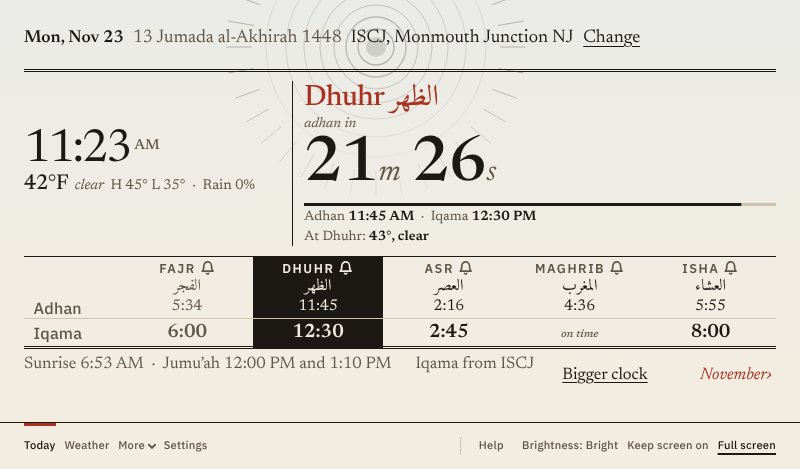
- The next prayer, and what is coming: adhan in, or once the adhan has been called, Adhan called · iqama in in red.
- How long until it.
- The bar, filling up as the wait goes by.
- Its adhan and iqama times. On Fridays it shows the khutbah times.
- The weather at that prayer. After Isha it is the weather at tomorrow’s Fajr.
On a big screen: the day ruler
On a screen at least 1280 by 720, such as a 10-inch tablet or a computer, a day ruler takes the place of the bar: the day from an hour before Fajr to an hour after Isha. The inked part is the day so far, the red ring is now, and each prayer has a letter: F, rise for sunrise, D (J on Fridays), A, M and I. The next prayer’s letter is red.
On a phone
Held upright, a phone shows the clock and the next prayer first, with the timetable folded away under them. Tap All prayer times to open it, and Hide prayer times to fold it again. The phone remembers which you chose.
After Isha: tomorrow’s times
Once the Isha iqama has passed, the timetable moves on to the next day, because that is what you need to see by then: the first column says Tomorrow, and the five prayers, sunrise and the countdown are all tomorrow’s. If no iqama is set for Isha, it moves on an hour after the Isha adhan instead.
The date at the top of the screen does not change with it. That still turns at midnight, so the screen always tells you today’s date. The Hijri date beside it follows your own setting, at midnight or at Maghrib; chapter 2 explains it. On a Thursday evening the timetable shows Friday, so the Dhuhr column becomes Jumu’ah with the khutbah times.
The other screens
The row along the bottom holds Today, Weather, More and Settings. More opens Quran, Adhkar, Month and Feedback (and Help at the end, on a phone), which are kept out of the way so the prayer times stay easy to read from across the room. It closes again as soon as you choose one, or if you tap anywhere else.
If you leave the app on another screen, it returns to Today by itself after two minutes, so a tablet on the wall is never left showing something else. It stays where it is while a recitation is playing, while you are typing in Settings, or while a window is open.
Weather warnings
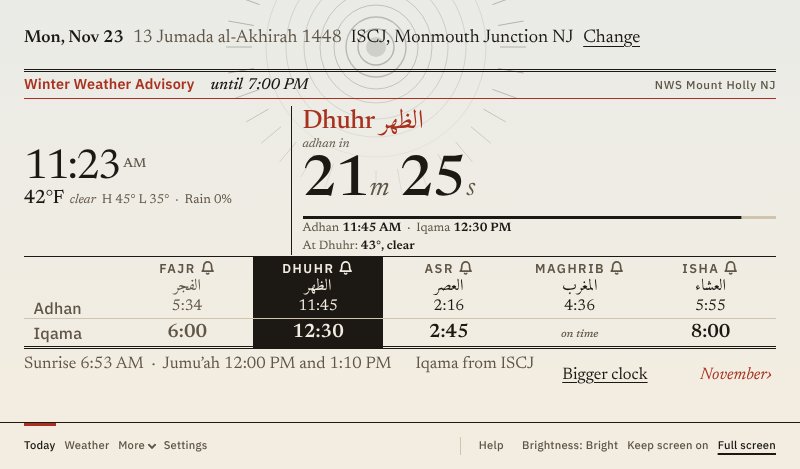
- While an official warning, watch or advisory from the US National Weather Service is in force where you are, a red-ruled line names it and says when it ends. If there is more than one, it shows the most serious and how many more there are. The line goes away by itself when it ends. It is for US locations only.
Under the timetable
Scroll down below the timetable for the dua and a few more things. Just above the dua, Sync now reads the iqama times and the weather again, and Last synced beside it says when that last worked. The app also does this by itself: weather every 15 minutes, iqama times about every hour and at the start of each day, and straight away when the internet comes back, so you should not need the button. If the masjid’s times could not be read, or the last good sync was over a day ago, that line stands out in colour and the times shown are the last ones saved. When a new version of the app is published, it updates itself at a quiet moment and puts the full screen view back.
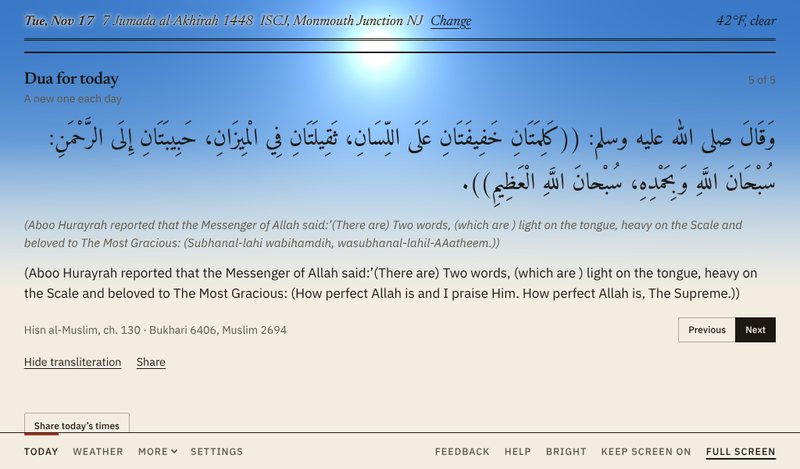
- Previous and Next move between the duas for this time of day. The duas change with the time of day.
- Hide transliteration leaves just the Arabic and English. Share sends the dua to someone, and Listen to the full chapter, when it shows, plays it from Hisn al-Muslim (this needs the internet).
- Share today’s times sends today’s timetable to family or friends, by message or any app you choose.
Prayer names
The timetable shows each prayer’s name in English and in Arabic:
| English | Arabic |
|---|---|
| Fajr | الفجر |
| Sunrise | الشروق |
| Dhuhr | الظهر |
| Asr | العصر |
| Maghrib | المغرب |
| Isha | العشاء |
| Jumu’ah | الجمعة |
Good to know
- The line above Sync now says where the iqama times came from and when they last changed.
- The countdown counts whole minutes and reaches zero at the adhan, so it always agrees with the time printed beside it.
- The first time you open the app, a one-line note above the clock asks where you are. Chapter 2 explains the choices.