Chapter 5
Adhan and alerts
IqamaHub can call the adhan at each prayer, and remind you before the adhan and before the iqama. Each prayer has its own settings.
Before you start
- Alerts only work while IqamaHub is open on the screen.
- Tap the screen once after opening the app, so the browser lets it play sound.
- Out of the box, every prayer is set to Message only: a note appears, but nothing sounds. Follow the steps below to choose a sound.
Settings › Adhan and alerts
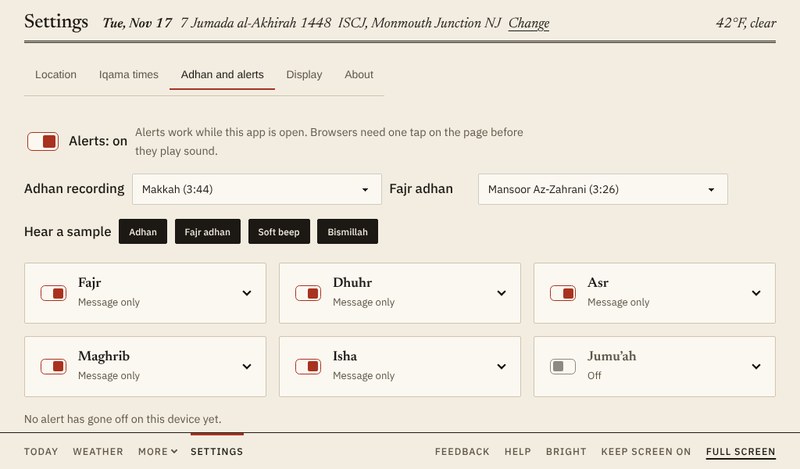
- Alerts: on turns every alert on or off at once.
- Adhan recording is the adhan used for Dhuhr, Asr, Maghrib and Isha. There are five: Makkah, Egyptian style, Masjid Al-Aqsa, Ottoman style and Mishary Al-Afasy.
- Fajr adhan has its own recording: Mansoor Az-Zahrani or Mishary Al-Afasy.
- Hear a sample plays the adhan, the Fajr adhan, the soft beep or the spoken Bismillah, so you can choose.
Each prayer’s alerts
Below the recordings is a card for each prayer. Tap a card to open it.
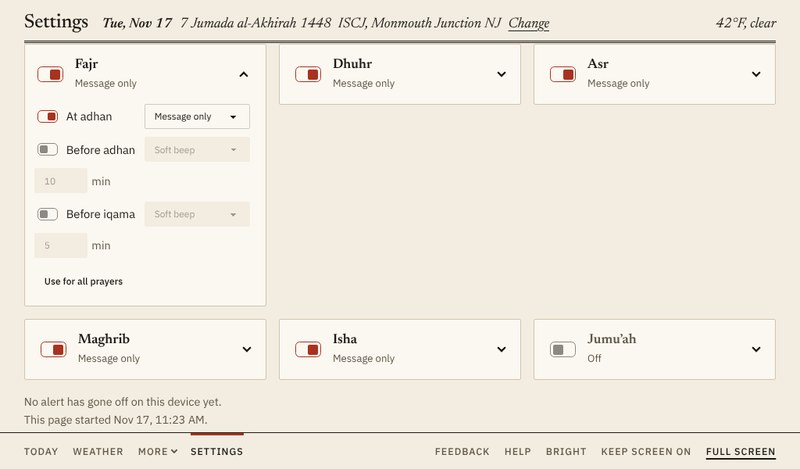
- The switch on the card turns all of that prayer’s alerts on or off.
- At adhan: what happens at the adhan time. Choose Message only, Soft beep, Bismillah, spoken, Adhan, your default recording, or any one recording.
- Before adhan: turn it on for a reminder before the adhan, and choose its sound.
- Minutes: how long before. Before iqama works the same way, counted back from the iqama time.
- Use for all prayers copies this card’s choices to the other four prayers.
Jumu’ah
The Jumu’ah card is off to start with. Turn it on for a reminder before the Friday khutbah. It uses ISCJ’s khutbahs, 12:00 PM and 1:10 PM, and reminds you before each one, unless you type your own khutbah times. If your masjid has more than one, press Add another khutbah.
When an alert sounds
- A large red Stop button appears. Tap it to silence the adhan. Your alert settings stay as they are.
- If Quran recitation is playing, it pauses for the alert and carries on afterwards.
- The line at the bottom of this page shows the last alert that went off, which helps check that alerts are working.
Good to know
- If you see Tap to enable sound, tap it. The alert then plays.
- A good start: At adhan set to Adhan, your default recording, and Before iqama set to Soft beep 5 minutes before.