Chapter 7
Quran
Listen to the whole Quran from 299 recitations, keep your favourites and playlists, and save surahs to listen with no internet.
Finding a recitation
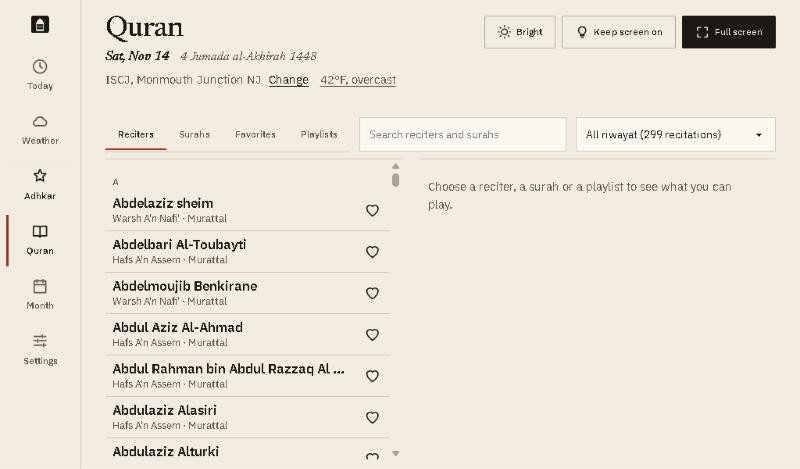
- Four lists: Reciters, Surahs, Favorites and Playlists.
- Search finds a reciter or a surah by name.
- Riwayah: show all recitations, or only one riwayah such as Hafs A’n Assem or Warsh A’n Nafi’.
- The heart adds a reciter to your favourites.
Playing a surah
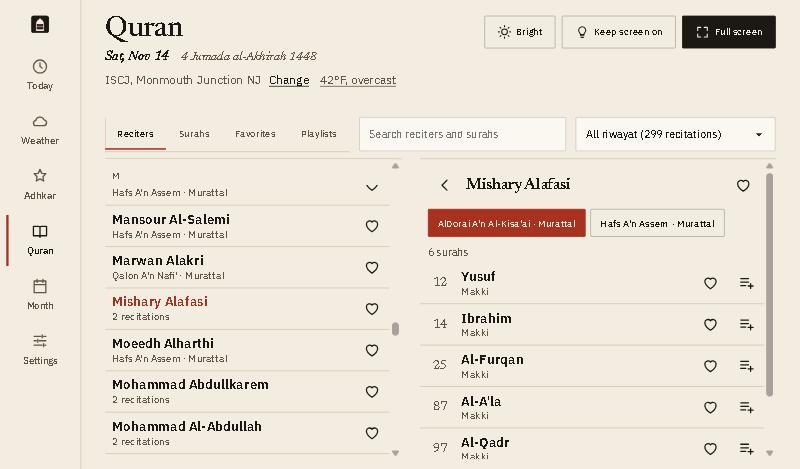
- Choose a recitation if the reciter has more than one.
- Tap a surah to play it. The player appears at the bottom.
- The heart adds the surah to your favourites.
- Add to a playlist: pick a playlist, or type a name to make a new one.
The player

From left to right:
- The timeline above shows how far through the surah you are. Drag it to move.
- Shuffle, previous surah, back 10 seconds, play or pause, forward 10 seconds, next surah.
- Repeat: tap to go from off, to the whole list, to this surah only.
- On the right: heart, add to a playlist, open (Now playing and the queue), and close, which stops playing.
Now playing
Tap the surah's name in the player, or open, to see it full screen. On a touch screen you can also swipe the player up. To go back, pull the picture down, or swipe the player sideways to stop and close it.
- The picture is a watercolour of the Kaaba for a Makki surah, or of Masjid an-Nabawi for a Madani one, with Makki or Madani at the top. The surah's Arabic name is under it. In the E-ink and High contrast looks it shows the surah's number and Arabic name in a star instead. The timeline runs along its foot.
- On the picture: the down arrow closes Now playing and the music carries on; × stops playing and closes the player.
- Under the surah: previous, play or pause and next, then heart, shuffle, repeat and add to a playlist.
- ⋯ shows the rest: back 10 seconds, forward 10 seconds, the playback speed and the volume.
- Up next, below, lists what plays after this surah. Tap one to play it now.
Playlists
Open the Playlists list to play one, rename it or delete it. Surahs can be moved up and down inside a playlist.
Listening offline
Every surah you play is saved on your device as it plays, and so is the next one in the list. Played again, it comes from the device, not the internet. You can also save surahs yourself before you need them.
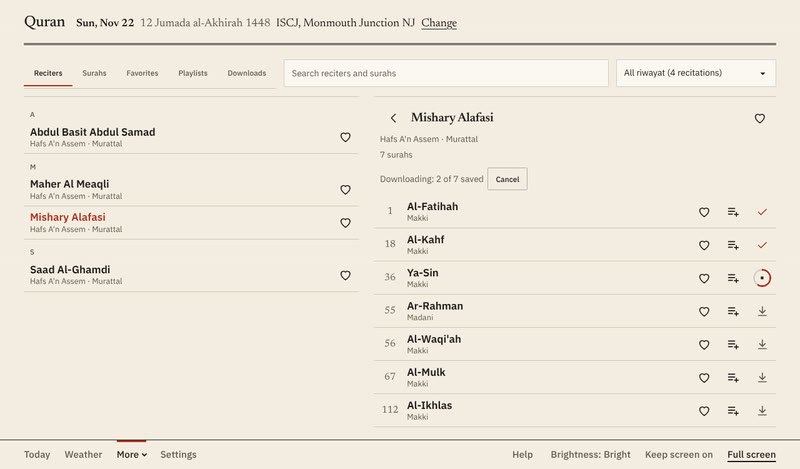
- The arrow downloads that surah.
- The ring fills as it downloads. Tap it to cancel.
- The tick means it is saved on this device. Tap it to see its size, or to remove it.
- Download all saves every surah of this recitation. It first tells you how much space that takes and how much your device has free. They download one at a time while you use the app, and Cancel stops them; the ones already in are kept.
The Downloads list
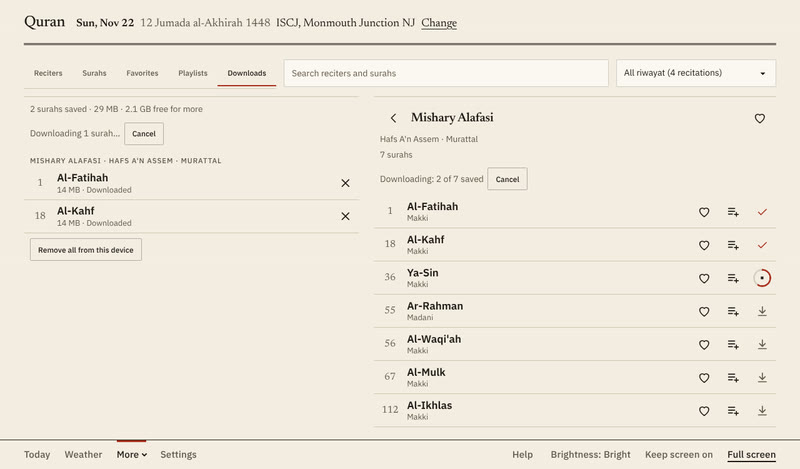
- Downloads lists every saved surah, by reciter.
- How much is saved, and how much room is left.
- The cross removes one surah from this device.
- Remove all from this device frees the space. Your favourites and playlists stay.
When there is no internet
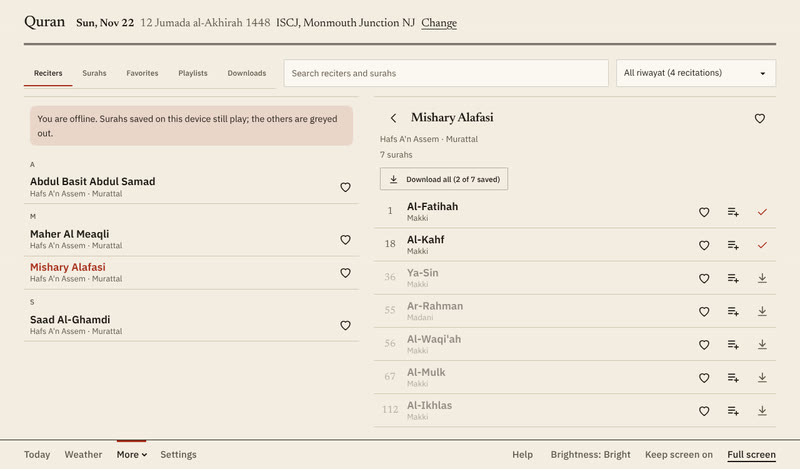
- A note at the top says you are offline.
- Saved surahs play as usual, and you can move around in them.
- The others are pale. Tapping one tells you it needs the internet. Next and previous skip over them.
If the internet drops in the middle of a surah, the player waits and carries on from the same place when the connection is back. You will see “The connection dropped” and then “Back online. Carrying on.” If the surah was already saved, it carries on at once.
Good to know
- When an adhan or alert plays, the recitation pauses, and carries on afterwards.
- Recitations come from mp3quran.net. A surah needs the internet the first time; after that it plays from your device.
- A surah you downloaded stays until you remove it. One saved because you played it may be removed when your device runs short of space, oldest played first. To keep it for good, tap its tick and choose Keep it for good.
- Saved surahs live in this browser on this device. Clearing the browser’s data for the app, or uninstalling it, removes them.
- Favourites, playlists and where you stopped are kept on this device.