Chapter 4
Iqama times
The iqama is when the prayer starts at the masjid. Each prayer can follow ISCJ, a time you choose, or a number of minutes after the adhan.
Settings › Iqama times
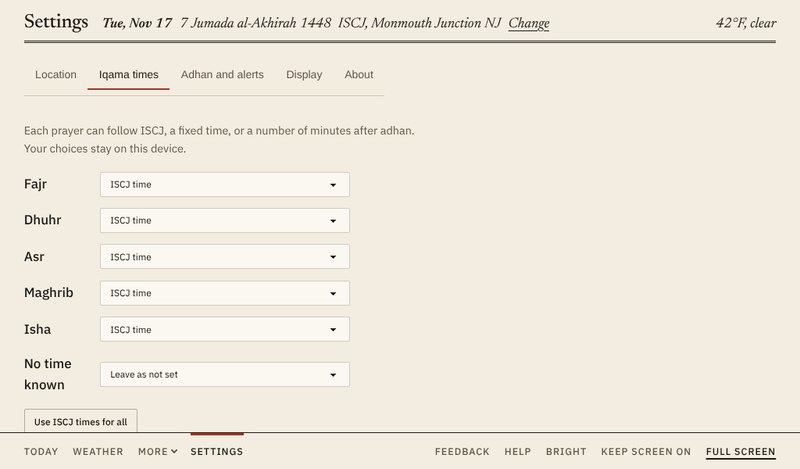
- Choose for each prayer from its drop-down:
- ISCJ time: the masjid’s own iqama time, read from its timetable through the day.
- Fixed time: the same time every day, such as 8:00 PM for Isha. Type it in the box that appears.
- Minutes after adhan: for example 10, so the iqama moves with the adhan as the seasons change. Any number from 0 to 180.
- No time known decides what a prayer shows when there is no time for it from the masjid or from you. It stays Leave as not set unless you change it. Choose Minutes after adhan and type a number, and those prayers show that time with the word default under it, so nobody mistakes it for the masjid’s own time.
- Use ISCJ times for all puts every prayer back to the masjid’s times.
Example
Your masjid prays Isha 10 minutes after the adhan, and Fajr at 6:00 AM all winter:
- Next to Isha, choose Minutes after adhan and type 10.
- Next to Fajr, choose Fixed time and type 6:00 AM.
- Open the Today screen. The new times show under Isha and Fajr straight away.
Good to know
- Away from ISCJ, the first choice reads Not set instead of ISCJ time, and the button reads Clear all.
- A time marked default is only the app’s guess from your own setting. If you learn the masjid’s real time, set it for that prayer so the word goes away.
- On Fridays, the Dhuhr column shows the Jumu’ah khutbah times instead of an iqama time.
- Your choices stay on this device.